origin橘子ea反作弊错误easy anti-cheat untrusted system file comctl32.dll
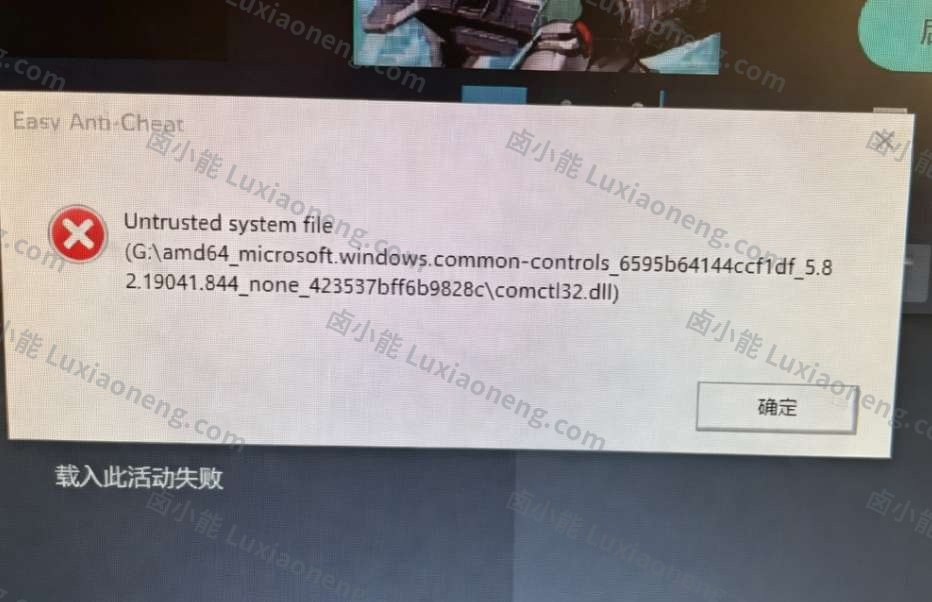
问题症状:
1、打开游戏报错弹窗提示untrusted system file comctl32.dll
2、origin橘子ea反作弊错误easy anti-cheat untrusted system file comctl32.dll

问题症状:
1、打开游戏报错弹窗提示untrusted system file comctl32.dll
2、origin橘子ea反作弊错误easy anti-cheat untrusted system file comctl32.dll
1、[【dx35修复】](https://wwz.lanzouw.com/iiH4Qo9lifc)
卸载所有vc++,解压缩dx35,运行对应的修复
如果是WIN7需要打补丁Windows6.1-KB2999226-x64
2、cmd管理员身份运行
for %i in (%windir%\system32\*.ocx) do regsvr32.exe /s %i
for %1 in (%windir%\system32\*.dll) do regsvr32.exe /s %1
3、directx修复工具,工具标签,选项,directx加速标签,把三个功能都开开
4、卸载杀软[【windows defender屏蔽工具】](https://www.lanzouw.com/iw0TCpk76fi)
windows defender打开第一个城墙的工具,启用安全中心,然后打开杀毒设置
关闭实时防护+防篡改等四个,然后应用控制关闭浏览器筛选sm什么的四个,然后再次关闭安全中心
5、然后一件屏蔽防火墙
NetSh Advfirewall set allprofiles state off
6、删除对应错误文件,验证完整性或修复游戏